Booking Widget Overview
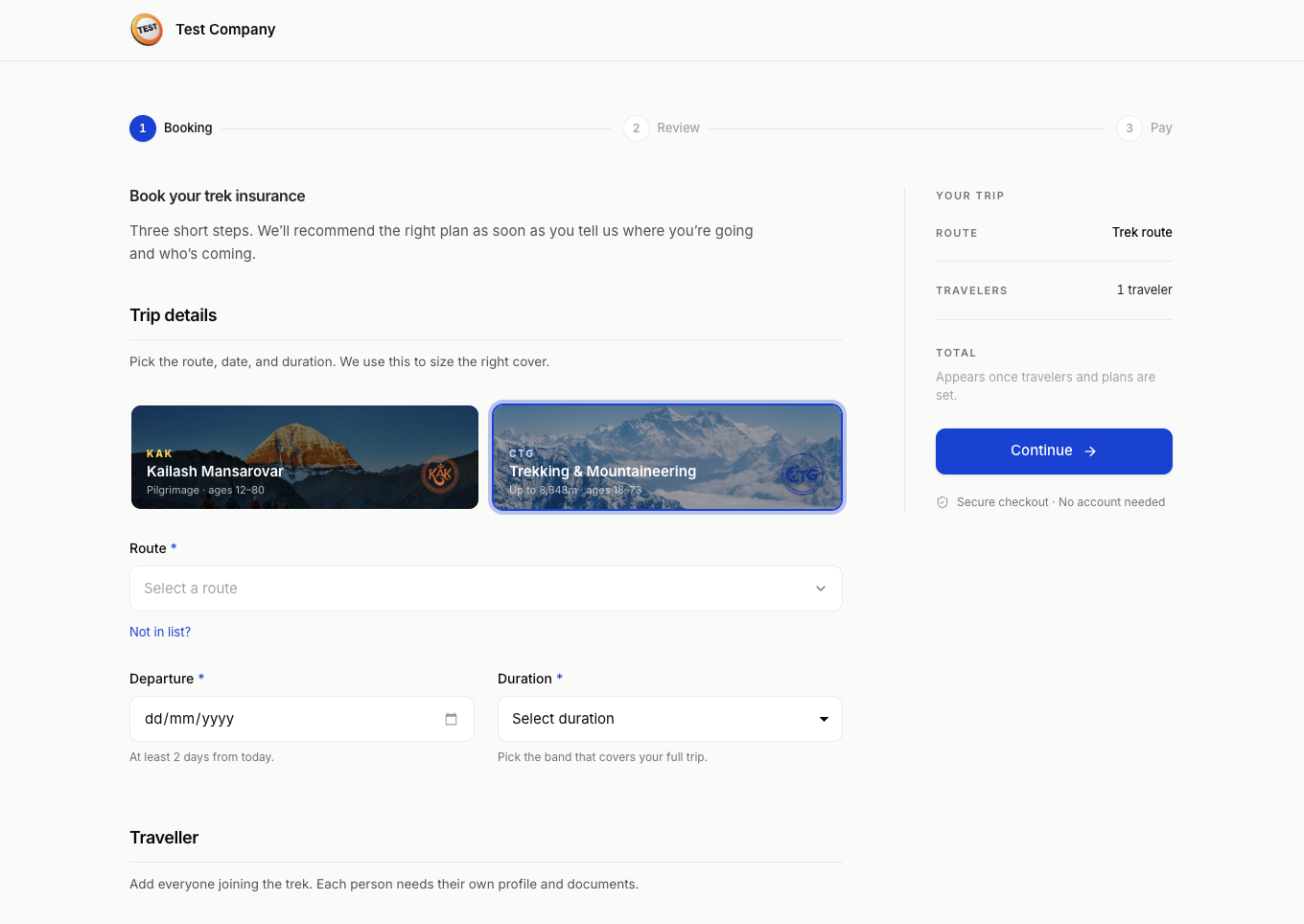
The HGN Booking Widget is a complete, hosted trek-insurance booking flow that you embed in your own website as a single full-page iframe.
Your customer stays on your domain. HGN renders and maintains the booking experience, the payment logic, and the product rules.
Roughly 15 minutes to integrate
One HTML page containing one iframe. No dependencies, no build step, and no framework requirement.
The key idea
The customer sees your address bar, your logo, and your brand colour, while the booking flow itself is served securely from book.hgn.com.np.
your-agency.com/insurance   ←  the customer sees this
    └── full-page iframe
        └── book.hgn.com.np/<your-slug>   ←  HGN renders this
What it does
The widget is a production-ready booking flow for trek-insurance purchases. It lets you offer HGN insurance through your own website without building or maintaining the insurance flow yourself.
- Runs at
book.hgn.com.npand embeds inside your website. - Uses your agency slug and publishable key to load your configuration.
- Displays your logo and primary colour, both set in the HGN dashboard.
- Handles the whole flow: trip details, traveller profiles and documents, plan selection, terms acknowledgement, and payment.
- Redirects the customer after payment to your return URL, or to the HGN hosted result page.
How it works
flowchart TD
A["Customer visits<br/>your-agency.com/insurance"] --> B["Your page loads a<br/>full-page iframe"]
B --> C["book.hgn.com.np/<slug><br/>?mode=full&pk=<key>"]
C --> D["Customer completes<br/>the booking flow"]
D --> E["Customer clicks Pay"]
E --> F["Top-level window navigates<br/>to the payment gateway"]
F --> G["Customer pays"]
G --> H["Gateway redirects to your<br/>return URL, or the HGN<br/>hosted result page"]Note step 6: when the customer pays, the top-level browser window navigates to the gateway — the payment page does not render inside the iframe. This is why the iframe needs allow="payment; clipboard-write" and must not carry a sandbox attribute.
That also means the customer finishes on whichever page the gateway redirects to, outside your iframe. Setting a return_url is how you bring them back to your own site; without one they land on HGN's hosted result page. See Step 4.
This pattern keeps your domain visible to the customer while HGN maintains the booking flow, payment logic, and product rules centrally.
Quick reference
The widget URL always takes this shape:
With an optional return URL:
book.hgn.com.np is the sandbox host
Every URL in this documentation points at HGN's test environment. Build and test against it freely — but do not hand-copy it into your live page.
Copy your real Embed URL from Booking Widget › Settings in the dashboard, which carries the correct host for your account. The production host is issued alongside your live credentials over WhatsApp or another secure channel, and is deliberately not published here.
See Environments for every sandbox host and what changes when you go live.
The one rule
Embed that URL as a full-page iframe at 100vw × 100vh. Do not add a wrapper, a sandbox attribute, or any page chrome around it.
Your page must be served over HTTPS
The widget refuses to be framed by an http:// page. This applies to local development and staging as well as production — see Local testing.
Browser support
| Browser | Supported versions |
|---|---|
| Chrome, Safari, Firefox, Edge | Last two major versions |
| iOS Safari | 14 and above |
| Android Chrome | 90 and above |
The widget is designed mobile-first and supports full-page responsive use.
What you can and cannot change
| Item | How to change it | Notes |
|---|---|---|
| Widget logo | Upload on your company profile | Appears in the widget header. Required before you can go live |
| Primary colour | Set in the HGN dashboard | Buttons, focus states, accents. Validated for contrast — see below |
| Return URL | Append return_url to the iframe source |
Optional. Otherwise the HGN hosted result page is used |
| Widget footer | Not configurable | A single line crediting Himalayan Guardian as the insurer |
| Booking flow steps | Not configurable | Driven by insurance product requirements |
| Available routes and plans | Managed by HGN | Backend-driven |
| Languages | English only at launch | More may be added later |
Branding is configured once in the dashboard and applies automatically. You do not need to change code when branding changes.
Pick a mid-tone primary colour
Your colour is checked before it is saved. Very light and very dark colours are rejected, as are colours that neither black nor white text reads well against — a button nobody can see is worse than an off-brand one. The safest choice is the colour your own site already uses for buttons.
In this section
- Integration — prerequisites, quickstart, and the full step-by-step
- Payment Verification — return URLs and verifying payment server-side
- WordPress — installing on a WordPress site
- Troubleshooting — common problems and fixes
- Changelog — widget release notes
Other ways to integrate
The Booking Widget is the middle of the three HGN integration approaches.
| Approach | What it gives you | |
|---|---|---|
| 1 | Referral Link | A tracked link on your site. No code, set up in minutes |
| 3 | API Integration | Full control, built into your own system |
Related
- Branding assets — logos and assets for partner sites