Payment Verification
Only needed if you built your own result page. If you use the HGN hosted result page, verification is handled for you and you can skip this page.
Corrected in widget 1.1 — this page previously documented an endpoint that does not exist
Earlier versions of this guide told you to verify against:
That URL has never existed and returns 404. If you built a result page against it, your verification call has been failing every time. Following the rest of this guide correctly — never confirm without a verified response — means your customers have been seeing a "we are confirming your payment" page instead of a confirmation.
The working procedure is below. If you are unsure whether you are affected, check your server logs for 404 responses to book.hgn.com.np.
What happens after a customer pays
- The customer clicks Pay in the widget.
- The widget creates a payment session against the configured gateway — CyberSource for card payments, Fonepay for QR payments.
- The top-level browser window navigates to the gateway's hosted payment page.
- The customer completes the card payment or scans the QR code.
- The gateway redirects the customer to your configured return URL, or to the HGN hosted fallback page.
- That result page receives
statusandpaymentRefquery parameters.
| Parameter | Values |
|---|---|
status |
success, failed, cancelled, or expired |
paymentRef |
The gateway payment reference, used for verification |
paymentRef is not an order reference
Its shape is <orderRef>-<epochMillis>. It looks like an order reference with a suffix. Treat it as an opaque lookup key: do not store it as an order reference, and do not try to recover the order reference by splitting on the last hyphen.
The booking exists before payment
The booking is created server-side before payment is attempted. A successful payment transitions the booking status. If payment fails, the booking stays pending payment and the customer can retry — a failed payment does not lose their work.
Never trust the query string
This is a security requirement, not a suggestion
Anyone can type ?status=success into their address bar and load your result page. If your page shows a confirmation based on that parameter alone, you will confirm bookings that were never paid for.
Always verify server-side using paymentRef before showing a final confirmation.
Use the verified response — never the query string — to drive anything that matters: confirmation screens, emails, releasing inventory, or updating your own records.
The verification endpoint
Verification uses the Partner API, called from your server:
GET https://apitest.himalayanguardian.com/api/external/v1/orders/{paymentRef}/payment-status
Authorization: Bearer <your access token>
This is the sandbox host — do not ship it
Every example on this page uses apitest.himalayanguardian.com, HGN's test
server. Build and test against it freely.
Your production host and live credentials are issued separately, over WhatsApp or another secure channel agreed with your account manager. They are deliberately not published here. Point your live result page at the host you were given — verifying a real payment against the sandbox will not find the order, and your page will sit in the "confirming your payment" state forever.
Keep the host in an environment variable rather than inline, so moving from test to live is a config change and not a code edit. See Environments for every sandbox host.
Pass the paymentRef from the return URL through verbatim — the endpoint accepts the gateway payment reference and resolves it back to the order it paid for.
This endpoint requires Partner API credentials
Unlike the publishable key, these are secret and must never reach a browser. Ask your HGN account manager to issue Partner API client credentials, then follow Authentication to exchange them for an access token.
There is no unauthenticated public equivalent. If you do not want to hold API credentials, use the HGN hosted result page instead — it needs no verification work from you.
Response
{
  "success": true,
  "data": {
    "orderRef": "ORD-2026-000247",
    "orderStatus": "PAID",
    "paymentRef": "PAY-2026-000001",
    "paymentStatus": "SUCCESS",
    "paymentMethod": "CYBERSOURCE",
    "amount": 590.00,
    "currency": "NPR",
    "completedAt": "2026-07-07T03:30:00Z"
  }
}
Read data.paymentStatus. It is UPPERCASE — it does not match the lowercase status query parameter, so compare against the right vocabulary:
paymentStatus |
Meaning |
|---|---|
SUCCESS |
Paid. Safe to confirm and fulfil |
NOT_INITIATED |
No payment attempted yet. This is a 200, not an error |
PENDING, INITIATED |
In flight. Do not confirm |
FAILED, CANCELLED |
Not paid |
Guard on the field, not the shape
The "no payment yet" response omits paymentRef, amount, currency, and completedAt entirely. Read paymentStatus first and only reach for the other fields once it is something other than NOT_INITIATED.
The multi-traveller limitation
A widget booking creates one order per traveller, grouped together. When a customer pays for more than one traveller in a single checkout, the resulting paymentRef covers an order group and cannot resolve to a single order — the endpoint returns 400.
Plan for this before you build a custom result page
Multi-traveller bookings are common. If you cannot verify them, your result page must fall back to the neutral "we are confirming your payment" state for exactly the bookings that are worth the most.
Two ways forward:
- Use the HGN hosted result page. It handles every case, including groups. This is the recommended option.
- Talk to your account manager about group-level verification before committing to a custom page.
Examples
Each example assumes you already hold a Partner API access token. See Authentication for obtaining and caching one.
const HGN_BASE = "https://apitest.himalayanguardian.com/api/external/v1";

app.get("/booking-complete", async (req, res) => {
  const { paymentRef } = req.query;

  if (!paymentRef) {
    return res.status(400).render("error");
  }

  // Verify server-side. The `status` query param is NOT trusted.
  const verify = await fetch(
    `${HGN_BASE}/orders/${encodeURIComponent(paymentRef)}/payment-status`,
    { headers: { Authorization: `Bearer ${await getAccessToken()}` } }
  );

  if (!verify.ok) {
    // Includes the 400 returned for multi-traveller group payments.
    // Show a neutral "we're checking" page, never a confirmation.
    return res.render("pending", { paymentRef });
  }

  const { data } = await verify.json();

  switch (data.paymentStatus) {
    case "SUCCESS":
      await fulfilBooking(data.orderRef);   // emails, records, inventory
      return res.render("success", { paymentRef, orderRef: data.orderRef });
    case "FAILED":
      return res.render("failed", { paymentRef });
    case "CANCELLED":
      return res.render("cancelled", { paymentRef });
    default:
      // NOT_INITIATED, PENDING, INITIATED — not paid yet.
      return res.render("pending", { paymentRef });
  }
});
const HGN_BASE = "https://apitest.himalayanguardian.com/api/external/v1";

export default async function BookingComplete({
  searchParams,
}: {
  searchParams: Promise<{ paymentRef?: string }>;
}) {
  const { paymentRef } = await searchParams;
  if (!paymentRef) return <ErrorState />;

  // Runs on the server. Never trust searchParams.status.
  const res = await fetch(
    `${HGN_BASE}/orders/${encodeURIComponent(paymentRef)}/payment-status`,
    {
      headers: { Authorization: `Bearer ${await getAccessToken()}` },
      cache: "no-store",
    }
  );

  if (!res.ok) return <PendingState paymentRef={paymentRef} />;

  const { data } = await res.json();

  if (data.paymentStatus === "SUCCESS")
    return <SuccessState orderRef={data.orderRef} />;
  if (data.paymentStatus === "FAILED")
    return <FailedState paymentRef={paymentRef} />;
  if (data.paymentStatus === "CANCELLED")
    return <CancelledState paymentRef={paymentRef} />;

  return <PendingState paymentRef={paymentRef} />;
}
<?php
$paymentRef = $_GET['paymentRef'] ?? null;

if (!$paymentRef) {
    http_response_code(400);
    exit('Missing payment reference');
}

// Verify server-side. $_GET['status'] is NOT trusted.
$url = 'https://apitest.himalayanguardian.com/api/external/v1/orders/'
     . rawurlencode($paymentRef) . '/payment-status';

$ch = curl_init($url);
curl_setopt($ch, CURLOPT_RETURNTRANSFER, true);
curl_setopt($ch, CURLOPT_TIMEOUT, 15);
curl_setopt($ch, CURLOPT_HTTPHEADER, [
    'Authorization: Bearer ' . hgn_access_token(),
]);
$body = curl_exec($ch);
$code = curl_getinfo($ch, CURLINFO_HTTP_CODE);
curl_close($ch);

if ($code !== 200) {
    include 'views/pending.php';   // never a confirmation
    exit;
}

$data = json_decode($body, true)['data'] ?? [];

switch ($data['paymentStatus'] ?? '') {
    case 'SUCCESS':
        fulfil_booking($data['orderRef']);
        include 'views/success.php';
        break;
    case 'FAILED':    include 'views/failed.php';    break;
    case 'CANCELLED': include 'views/cancelled.php'; break;
    default:          include 'views/pending.php';
}
import requests
from flask import request, render_template

HGN_BASE = "https://apitest.himalayanguardian.com/api/external/v1"


@app.route("/booking-complete")
def booking_complete():
    payment_ref = request.args.get("paymentRef")
    if not payment_ref:
        return render_template("error.html"), 400

    # Verify server-side. request.args["status"] is NOT trusted.
    try:
        res = requests.get(
            f"{HGN_BASE}/orders/{payment_ref}/payment-status",
            headers={"Authorization": f"Bearer {get_access_token()}"},
            timeout=15,
        )
        res.raise_for_status()
    except requests.RequestException:
        return render_template("pending.html", payment_ref=payment_ref)

    data = res.json().get("data", {})
    status = data.get("paymentStatus")

    if status == "SUCCESS":
        fulfil_booking(data["orderRef"])
        return render_template("success.html", order_ref=data["orderRef"])

    return render_template(
        {
            "FAILED": "failed.html",
            "CANCELLED": "cancelled.html",
        }.get(status, "pending.html"),
        payment_ref=payment_ref,
    )
Designing the result page
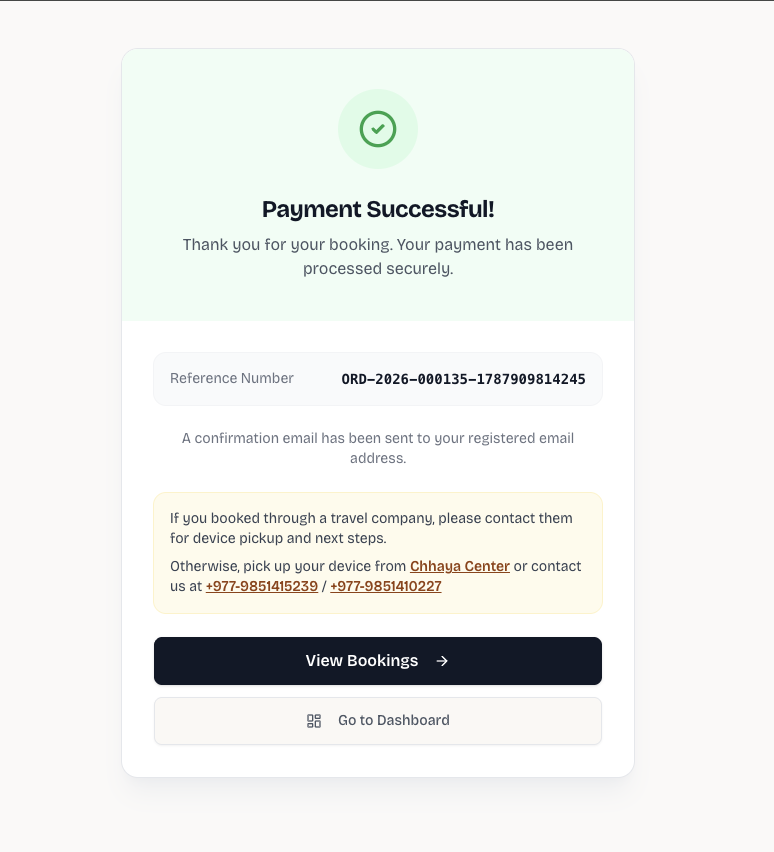
The page above is on the agency's own domain, in their own design, and it reached the confirmed state only after the server-side check came back SUCCESS. Note that it shows the order reference returned by verification rather than the paymentRef from the query string — that is the value worth storing and quoting to support.
Handle all four states. Customers reach failed and cancelled far more often than teams expect.
| State | What to show |
|---|---|
success |
Confirmation, order reference, what happens next |
failed |
Plain explanation and a clear way to retry. The booking is still pending, so retrying works |
cancelled |
Acknowledge the customer backed out, offer a link back to the booking page |
expired |
Explain the session timed out and offer to start again |
| Verification unavailable | A neutral "we are confirming your payment" message. Never a confirmation |
Always show the payment reference
Whatever the state, display paymentRef on the page. It is the first thing HGN support will ask for.
Next steps
- Integration — configuring the
return_urlon the iframe - Authentication — obtaining Partner API credentials
- Payments — the full payment-status reference
- Troubleshooting — customers not returning to your site